The Discord link converter
Paste a Taobao, Weidian or 1688 link into any channel and the bot answers with the QC photos, the live price and buy links for 29 shopping agents. Free, agent-neutral, and set up in about thirty seconds.
- Discord servers
- 128
- Links converted
- 236k
- Members reached
- 124k
Live converter
weidian.com/item.html?itemID=7360033751
https://www.bbdbuyeu.com/goods/WEIDIAN/7360033751?inviteCode=eagiVC
The same conversion the bot does in-channel. Pick any of the 29 agents to see its link.
rep_friendToday at 2:34 PM
https://weidian.com/item.html?itemID=7360033751

Qualit.lyAppToday at 2:34 PM
🔗 Converted Link!
LJR版本 创钩合集
💰 £50.63
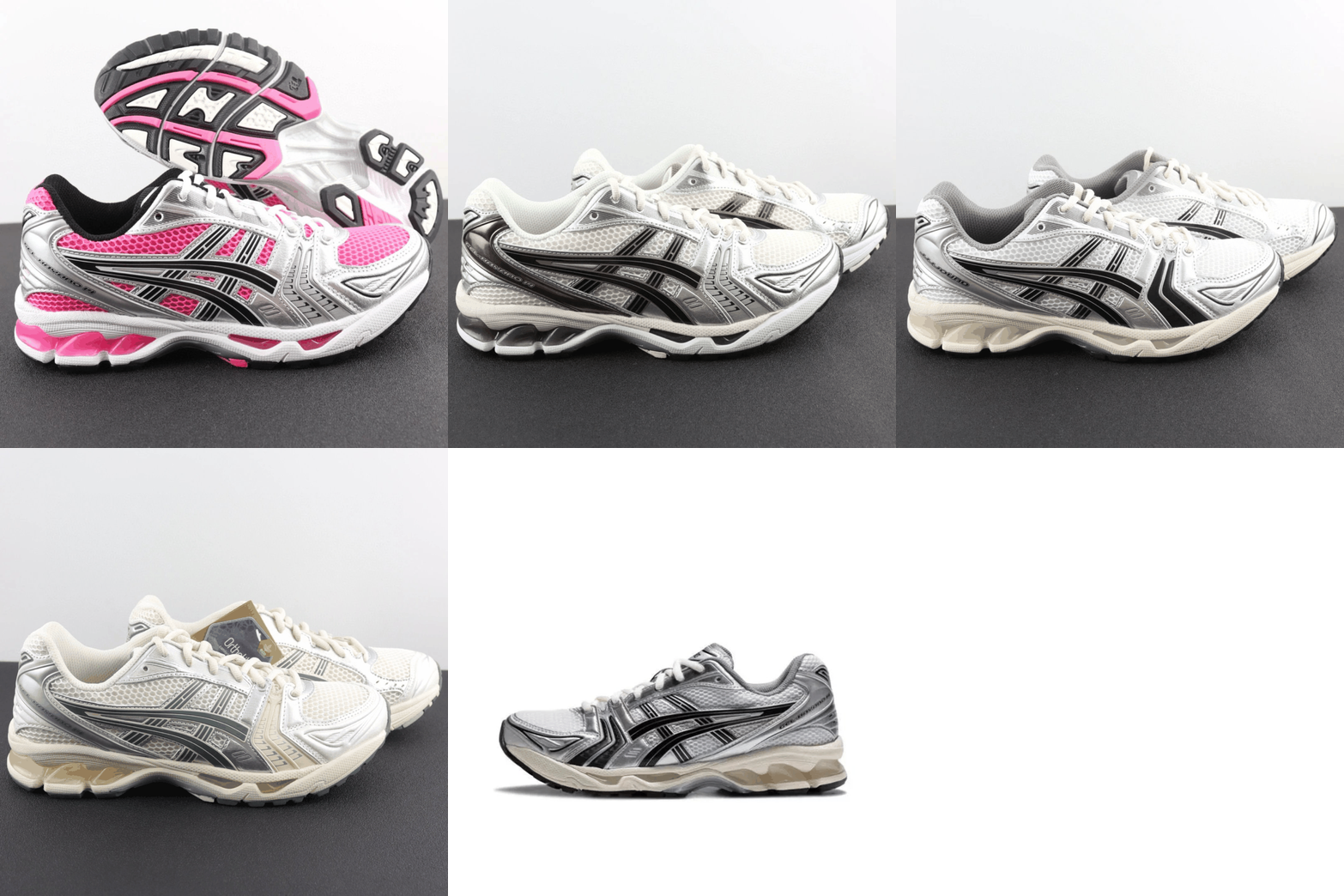
📏 Sizes: 40.5 · 41 · 42 · 42.5 · 43 · 44 · 44.5 · 45
 BBDBuy
 Kakobuy
 OopbuyRaw Weidian
 View 12 QC's📸Peek QCs✨AI Review🔖Save to Favorites
Three steps, one of which is real
The bot joins in the first step and stays quiet until the second — verifying inside the server is how it knows you actually run it.
- 01
Add it to your server
One authorisation screen, asking for Send Messages, Embed Links and Attach Files. Nothing that reads your other channels.
- 02
Verify the server
Discord drops you on a page with a `!verify` command and a code. Paste it in any channel — it needs Manage Server, which is the whole point of doing it there.
- 03
Paste a link
Any Taobao, Weidian or 1688 URL comes back as an embed. No command, no prefix. Pick the channel, agents and colour whenever you like.
Everything the embed carries
One message in the channel, and everything anyone needs to decide is already in it.
Converts on sight
The bot reads every message for a marketplace link and answers with the embed. It also unwraps links that are already an agent's — a Sugargoo URL posted in chat still converts to yours — and follows shortened ones.
QC photos in the embed
The full QC set for that listing, pulled from the index and paged with Prev/Next inside Discord. Nobody has to leave the channel to see what turned up.
QC videos
Where a buyer filmed the item rather than photographing it, the embed links the clip — the thing photos are worst at showing is exactly the thing video shows.
Animated previews
Several product shots stitched into a looping preview, so a listing reads at a glance instead of as one cropped thumbnail.
AI review, on tap
A button on the embed reads the QC set back and gives a plain verdict on the listing. Useful when there are forty photos and nobody wants to open all forty.
Prices in your currency
Listings are priced in yuan. The embed converts to whatever the server reads in, so nobody is doing mental arithmetic mid-haul.
Your embed, your colours
Set the accent colour and pick which agents get buttons. The preview on the settings page renders from the same state as the controls beside it.
Channel-scoped
Pin it to one channel so hauls stay tidy, or let it watch the whole server. Server owners choose, and can change it whenever.
Only owners can configure it
Settings are gated on Manage Server, checked against Discord on every write. A member posting links cannot change what the server converts to.
Taobao, Weidian and 1688
The three the bot reads, including shortened links and links already wrapped in another agent's URL.


All 29 agents
Switch on the ones your server uses and the rest stay out of the embed. Each has its own page, with a converter you can try on it.
BBDBuy$210 coupons for new users!Kakobuy$410 coupons for new usersOopbuy$210 coupons and 20% shipping OFF! Litbuy40% OFF + FREE Insurance & Packaging
 HipobuySign Now to Get 25% Off on All Shipping Lines
 CSSBuy$210 coupons for new users!
 SuperBuy12 years in industry! $86 coupons for new users!
 Mulebuy$219 coupons for new users!
 ACBuy$600 coupons for new users
 AllChinabuy$150 coupons for new users!
 Sugargoo$210 coupons for new users!
 CnFans$125 coupons for new users!
 RizzitGO$400 coupons for new users!
 Lovegobuy$580 Coupons + ¥5 + Free Item!
 Hoobuy50% off shopping + free gift!
 USFans$820 coupons for new users!
 OotdbuySign to get $500+20% OFF coupons !
 LoongBuy$300 coupons for new users!
 Joyagoo$210 coupons for new users!
 Eastmallbuy$210 coupons for new users!
 iTaobuy20% OFF and $300 Shipping coupons!
 GTBuy40% + 30% OFF Shipping! Join Discord for More Perks!
 CnshopperGet ¥2000 Coupons & 50% Off Shipping
 Vigorbuy30% OFF + $210 new customer benefits
 Alleurobuy$257 coupons for new users!
 PonyBuyShop Everything From China Without a Middleman
 WheebuyGet 40% OFF Shipping for New Users!
 UIDBuyTaobao, Weidian & 1688 Agent With Global Shipping
 Boonbuy492$ for new users!
Missing one? Ask on the contact page — the catalogue grows on request.
The paid converters do less of this
A free, agent-neutral converter with the QC photos already attached rather than sold separately.
- Free forever — no subscription, no link cap, no feature paywall
- Agent-neutral — 29 agents, and we take no position on which is best
- QC photos and videos linked from every embed, not sold as an add-on
- Set up in about 30 seconds — invite it, paste a link, done
Yes. The converter is free with no card and no link cap, and every server gets the same conversion features. The paid tiers buy custom agent codes and multi-server management, not the bot.
About thirty seconds. Click "Add to Discord", authorise it, then paste the !verify command Discord sends you back with — the next marketplace link posted in the server comes back as an embed.
Send Messages, Embed Links and Attach Files. Nothing else — and you can restrict it to a single channel from the server settings, in which case it never sees the rest.
It reads messages for Taobao, Weidian and 1688 URLs, including shortened ones and links already wrapped inside another agent's URL. There is no command to remember and no prefix to type.
Yes. All 29 are available and the server picks which ones appear; the rest stay out of the embed. The accent colour is configurable in the same place.
They are the buyer photos agents publish for each listing, indexed and matched back to the exact Weidian, Taobao or 1688 item. The embed shows the set for that listing, and the product page shows the whole thing.
Ask. The catalogue grows on request — tell us which agent and we will look at adding it.
Free forever, no card. The paid tiers buy custom agent codes and multi-server management — not the converter.